How to Verify Whether an Overseas Shopping Mall Shown in Search Ads Is an Official Brand Retailer
A sponsored position in Google Search or Google Shopping does not mean the seller is owned, approved, or authorized by the brand named in the advertisement. Advertising platforms review accounts and enforce policies, but fraudulent sellers can still attempt to impersonate established retailers.
The safest approach is to identify the company behind the ad, compare the landing-page domain with information published by the brand, and confirm the seller through an independent official channel before entering payment details.
How to Quickly Verify Whether a Website Shown in Search Ads Is an Official Retailer
Before placing an order, check the advertiser information, the brand’s official retailer directory, and the actual domain that receives the payment.
1. Google Ads Advertiser Verification Badges
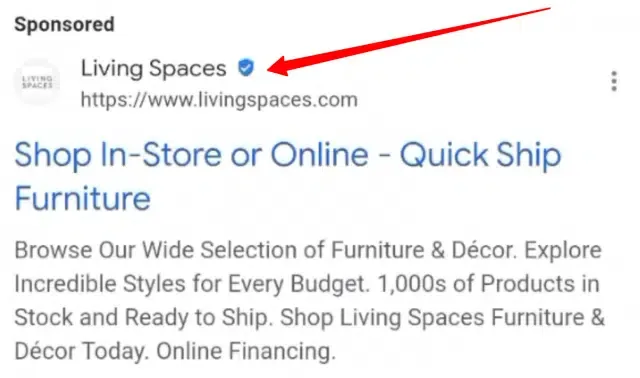
Select the three-dot menu or ad-information control beside the sponsored result. Depending on the ad format and region, Google may show the advertiser’s name, location, payer information, verification status, and links to additional information in the Ads Transparency Center.
Google states that verified advertiser names and locations appear in ad disclosures. It may also display information for advertisers that have not completed verification, marked accordingly.
Use this information as a lead, not as proof of authorization.
A legitimate advertisement may be paid for by a regional subsidiary, distributor, advertising agency, or marketplace operator whose legal name differs from the consumer-facing brand. An unrelated name therefore requires investigation but does not automatically prove fraud.
Compare the disclosed company with:
- The legal business named in the website’s terms and privacy policy.
- The company receiving payment at checkout.
- The distributor or retailer listed on the brand’s official website.
- The seller name shown on the invoice.
Google also states that advertiser verification does not guarantee or assume responsibility for the advertiser’s content or business activity. A verified badge confirms an identity record, not a commercial relationship with the brand.
2. Official Reseller Certificates
Do not rely on an “Authorized Retailer” logo displayed by the seller. Images, certificates, registration numbers, and brand seals can be copied from legitimate websites.
Open the brand’s official website independently by typing its known domain or finding it through verified corporate information. Look for pages titled “Where to Buy,” “Store Locator,” “Authorized Dealers,” “Retail Partners,” or “Distributors.”
Search by the retailer’s legal name, domain, location, and dealer number. A company may be authorized only in certain countries or for specific product categories.
When the brand does not publish a dealer list, contact its customer-support team and provide:
- The complete store URL.
- The seller’s legal business name.
- The country from which the order will be shipped.
- The product and model number.
- A screenshot of any authorization claim.
A badge that links only to another page on the seller’s own domain is not independent verification.
3. Brand Design & UI/UX Consistency
Design quality is a weak signal. Counterfeit stores can copy a brand’s logo, product photographs, navigation, color palette, and policy text. A sharp favicon or polished checkout does not establish ownership.
Inspect the domain character by character. Watch for added words, substituted letters, unusual subdomains, misplaced hyphens, or country-code domains not linked from the brand’s official website.
Also check whether the website clearly identifies:
- The company operating the store.
- A physical or registered business address.
- Customer-service contact methods.
- Shipping and return conditions.
- Warranty responsibility.
- Import duties and taxes.
- The entity that appears on the card statement.
Poor grammar and broken pages can be warning signs, but a professional design cannot replace independent confirmation.
Decoding “By Google” and Comparison Shopping Partner Labels
Shopping results may show the name of a comparison-shopping provider in addition to the merchant or product information. The exact wording and placement can vary by country, device, and ad format.
[User Search Query] ➔ [Google Shopping Ads] ➔ [Displays Comparison Service Label] ➔ [Clicks Through to Actual Retailer]
Mechanics of Comparison Shopping Services (CSS)
In countries covered by Google’s Comparison Shopping Services program, a CSS can submit product data and place Shopping ads or free product listings on behalf of merchants. A retailer may work with one or several CSS providers.
A label naming Redbrain, Kelkoo, Google Shopping, or another comparison service does not necessarily identify the business that will sell and ship the item. It may identify the service through which the product listing was submitted.
The original claim that a CSS typically receives approximately 20% of the cost per click or a fixed referral commission is unsupported. Commercial agreements differ and are not normally visible to shoppers.
Key Takeaway: A comparison-service label is neither proof of fraud nor proof that the seller is authorized. Confirm the merchant shown on the landing page, the company named at checkout, and the brand’s official dealer information.
Unmasking Exchange Rate and Multi-Currency Payment Fraud
A currency change does not automatically mean fraud. International stores may display estimated local prices while charging in the merchant’s trading currency. The risk arises when the final currency, exchange rate, or additional fees are hidden or changed without clear consent.
Discrepancies in the Checkout Process
Before payment, record the product price, shipping charge, taxes, duties, currency code, and final total.
Leave the checkout when:
- The currency changes without explanation.
- New processing fees appear only after card details are entered.
- The merchant does not identify the currency that will be charged.
- The seller demands payment by cryptocurrency, gift card, wire transfer, or another method with limited recovery options.
- The company name on the payment page differs from the store and no relationship is explained.
Dynamic Currency Conversion is a currency-choice service, not inherently a scam. Mastercard requires merchants offering DCC to give cardholders a clear choice between currencies and disclose the applicable rate and transaction information.
Exclusive Industry Data on Cross-Border Shopping Behavior
The original claims that cross-border cart abandonment averages 70% because of currency issues and that transparent local-currency payments reduce abandonment by 50% could not be verified from a consistent source. Unexpected fees and unclear currency information can discourage a purchase, but no universal percentage applies to every country, product, device, or payment method. Shoppers should focus on the actual total rather than an unsupported industry average.
The Authentic Retailer Checkout Experience
Legitimate international retailers use many e-commerce platforms, acquiring banks, payment gateways, and wallet providers. The presence of Shopify, BigCommerce, GoCardless, Wise, Stripe, or another recognizable company does not prove that the merchant is authorized. A legitimate store is also not required to offer the mid-market exchange rate. Currency conversion may include a processor margin, card-network rate, merchant markup, or foreign-transaction fee charged by the card issuer. A trustworthy checkout clearly states:
- The merchant of record.
- The currency being charged.
- The total price before authorization.
- Shipping, duties, taxes, and other fees.
- The refund currency and return conditions.
- Whether the card issuer may impose additional fees.
3 Technical Verification Steps for Everyday Shoppers
Technical tools can identify inconsistencies, but none can independently certify a retailer as genuine.
Step 1: Inspect Browser SSL Certificates
Use the browser’s site-information icon to confirm that the connection uses HTTPS and that no certificate warning is present.
Important Caveat: HTTPS encrypts communication between the browser and the website. It does not prove that the seller is honest. The FTC specifically warns that scammers also use encrypted websites.
Do not expect an official retailer to use an Extended Validation or Organization Validation certificate. Many legitimate sites use Domain Validation certificates or place their store behind a cloud or commerce provider.
Even the CA/Browser Forum states that an EV certificate confirms aspects of the certificate subject’s identity but does not guarantee that the company is trustworthy, reputable, legally compliant, or safe to do business with.
Step 2: Evaluate Trust Scores on ScamAdviser
ScamAdviser can provide additional risk signals about a domain. Its score is generated algorithmically from multiple technical and reputation factors.
Do not apply a universal rule that every score below 50 proves fraud. ScamAdviser describes its score as a risk indicator rather than a verdict, and notes that new domains can receive lower scores while they build history.
Use the result to identify questions, then verify them elsewhere. Look for reported phishing, copied content, inconsistent business information, unresolved complaints, or a history of changing domains.
Step 3: Cross-Reference ICANN Domain Data
ICANN’s lookup service can show publicly available registration data obtained through RDAP or WHOIS, including the registrar, domain status, and relevant dates.
A recently created domain can be suspicious when the site claims a long trading history, but it is not conclusive. Established companies sometimes launch new regional stores or change domains.
Hidden registrant information is also not proof of misconduct. ICANN explains that personal registration data may be redacted because of applicable law and privacy policies.
Contacting Parent Brands Directly to Confirm Legitimacy
Independent confirmation from the brand is the strongest test when the store does not appear in an official retailer directory.
Reaching Out via Official Support Channels
Open the brand’s official website without using the suspicious advertisement and use its published support form, telephone number, retailer locator, or live chat.
A verified social-media account can provide another contact route, but begin from a link published on the official corporate website whenever possible.
Ask whether the exact domain is:
- Operated by the brand.
- An authorized regional distributor.
- An approved online retailer.
- Covered by the brand’s warranty.
- Permitted to ship the product into your country.
Why Parent Brands Take Quick Action
Brands may investigate impersonation, trademark misuse, counterfeit sales, or unauthorized advertising, but response times and enforcement procedures vary. Do not assume every company has a team that can confirm a retailer immediately. If the brand cannot verify the seller, avoid sending payment or identification documents until stronger evidence is available.
Frequently Asked Questions (FAQ)
Q1: An ad offers 90% off items from a major brand. Could this be a legitimate clearance outlet?
It is possible, but the discount is a serious warning sign. Clearance stock, damaged packaging, discontinued products, refurbished goods, and official outlets can offer large reductions. The FTC advises consumers to compare prices and treat prices far below those offered elsewhere as a likely scam indicator.
Do not assume every brand enforces a Minimum Advertised Price policy. Such policies vary by manufacturer, product, country, and retailer agreement.
Confirm the outlet through the brand and check the condition, warranty, return policy, and final delivered price.
Q2: If the website displays an HTTPS padlock icon, is it safe to purchase?
No. HTTPS means the connection is encrypted; it does not verify the seller’s honesty or authorization. Check the domain, advertiser disclosure, legal business details, official retailer directory, independent complaints, payment terms, and return policy before purchasing.
Q3: What should I do if I purchased from an overseas store and realized it was fraudulent?
Take these three immediate steps:
Contact Your Card Issuer: Explain what happened and ask whether the card should be blocked or replaced. Blocking is especially important when card details may have been stolen or unauthorized charges have appeared.
File a Payment Dispute: Save the advertisement, order confirmation, product page, payment receipt, correspondence, promised delivery date, and tracking history. Ask the issuer about its dispute or chargeback process. Eligibility and deadlines depend on the payment method, issuer, country, and reason for the claim. The FTC advises credit-card users to contact their card company promptly when goods are not delivered or charges are incorrect.
Report the Ad: Use Google’s ad-reporting option from the ad disclosure or recent-ads area. Google provides a reporting process for ads that may violate its policies. Also report the seller to the brand and the relevant consumer-protection or cybercrime authority in your country.