Phishing Structure Behind Fake Community Login Pages
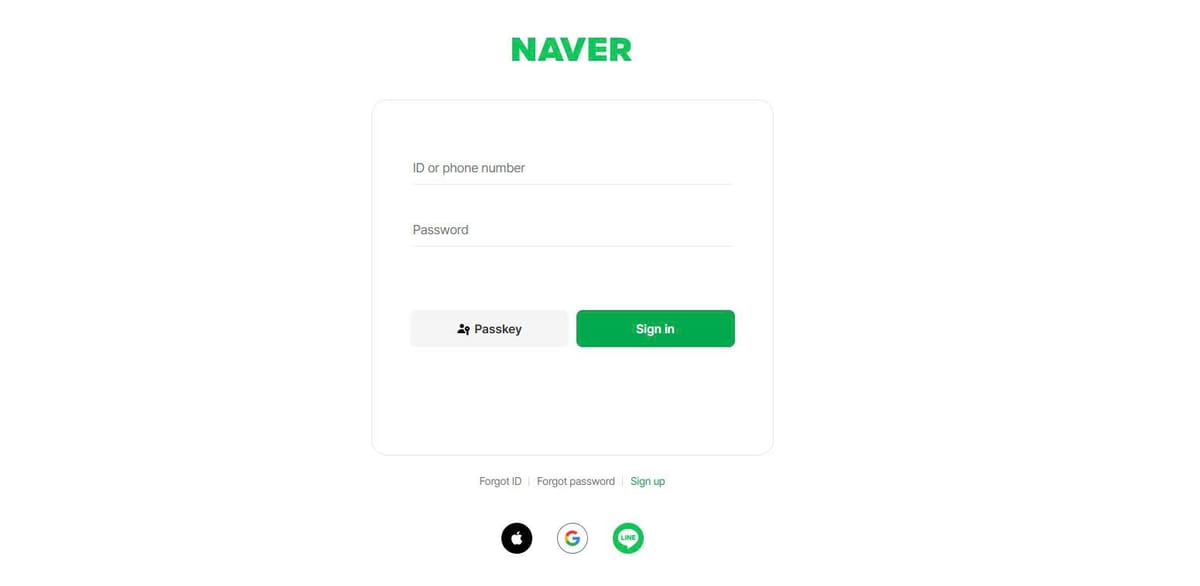
Participating in online communities like Naver Cafe or KakaoTalk Open Chat is a major part of digital life in Korea. However, community members are increasingly targeted by sophisticated phishing scams. You might receive a 1:1 direct message claiming your recent forum post violated community rules, accompanied by a link to "log in and appeal."
Clicking that link opens a login box that looks pixel-for-pixel identical to Naver or Kakao's official sign-in screen. These fake login pages are designed with a single goal: stealing your primary account credentials.
While phishers can copy visual layouts easily, they cannot fake underlying domain structures or browser security behaviors. This guide shows you how to detect fake community login pages using browser auto-fill cues and provides an emergency protocol to lock down your account if your password is exposed.
Anatomy of a fake community login page: How phishing pages copy Naver Cafe and KakaoTalk
Phishing operators rely on visual mimicry and urgency to trick users into handing over their passwords before inspecting the webpage address.
Spoofed Naver login domains
In Korea, official Naver logins always take place on the exact domain nid.naver.com. Phishing operators register domain names that look deceptively similar to casual readers—such as nid-naver-sec.com, nid.naver.login-check.xyz, or naver-nid.info. Always inspect the address bar carefully; if the text between https:// and the first forward slash (/) is not strictly nid.naver.com, the page is a fake.
Fake "Post reported" or "Event winner" lures
Phishers rarely send generic spam messages. Instead, they craft tailored community lures. On Naver Cafe or KakaoTalk Open Chat, scammers send private messages claiming: "Your post was reported for illegal advertising; log in within 24 hours to prevent account suspension," or "You won an exclusive gaming coupon." These messages create panic or excitement, prompting users to click without checking the URL.
Broken UI elements and non-functional footers
To build a fake login page quickly, scammers scrape the HTML code of a real login screen but omit the underlying functional links. If you open a suspicious login page, try clicking the footer links—such as "Privacy Policy," "Terms of Service," or "Help." On a fake page, these links are usually unclickable, produce JavaScript errors, or simply reload the same fake login box.
Testing login form behavior: Auto-fill failure and dummy account checks
Before typing your real account password into any login form linked from a message, you can perform two active tests to verify the page's authenticity.
Why browser password managers refuse to auto-fill on fake domains
The single most reliable anti-phishing security feature is your browser's built-in password manager (such as Chrome, Naver Whale, or the PASS app). Password managers bind your saved credentials strictly to exact domain names.
If you open a page that looks like Naver's login box, but your browser fails to auto-fill your saved Naver ID and password, treats the fields as blank, or offers no saved login suggestions, stop immediately. Your password manager has detected that the webpage is running on an unverified fake domain.
Entering dummy credentials to test page error responses
If you suspect a page is fake, type a completely random fake username and password (for example, fakeid9988 and wrongpass123).
A legitimate portal login system will take a moment to query its database before returning a specific error message stating "Incorrect ID or password." A fake phishing page, by contrast, has no connection to official user databases. It will often accept the fake password instantly, reload the page asking you to "try again," or redirect you to a completely unrelated website.
Emergency response steps if you entered your password on a fake page
If you realize that you accidentally entered your real password on a fake community login page, every second counts. Execute this three-step emergency protocol immediately to prevent hackers from seizing control of your account:
Step 1: Emergency password reset on the real portal
Do not use any link on the suspicious page. Immediately open a fresh browser tab, manually type naver.com or kakao.com into the address bar, and log into your account. Change your password immediately to a strong, completely new string.
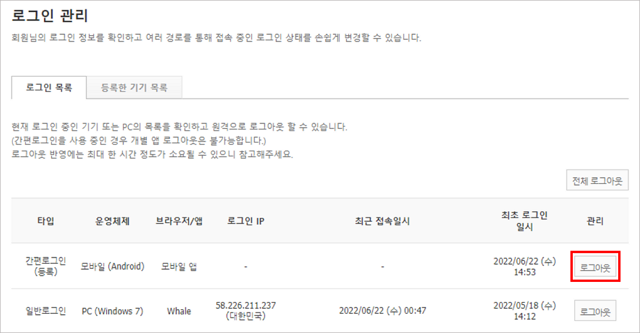
Step 2: Force remote sign-out on active devices (로그인 기기 관리)
Once your password is changed, navigate to Naver's Security Center (네이버 보안센터) or Kakao Account Settings. Go to the "Signed-In Device Management" (로그인 기기 관리) menu and click "Sign Out All Devices" (원격 로그아웃). This instantly terminates any active session the phisher may have opened using your stolen password.
Step 3: Turn on 2-step verification (2단계 인증)
Enable 2-Step Verification (2단계 인증) immediately. Once 2-step verification is active, any future login attempt from an unrecognized device requires an instant approval prompt sent to your physical smartphone. Even if a hacker captured your new password, they cannot access your account without physical possession of your phone.
Practical answers to common community login phishing questions
Here are quick answers to common questions about recognizing and handling community login phishing traps:
How can I confirm if a community login link is fake before clicking it?
Hover your mouse over the link (or long-press on mobile) to preview the destination URL. If the web address does not match the official community portal domain (such as naver.com or kakao.com), do not click the link.
What should I do first if I accidentally submitted my password on a fake login page?
Manually open the official portal site in a new tab, change your password immediately, force a remote sign-out on all active devices (로그인 기기 관리), and enable 2-step verification (2단계 인증).
Can a password manager protect me from logging into a fake community page?
Yes. Password managers bind credentials to exact domain names and will refuse to auto-fill on fake domains. If your saved login credentials fail to appear automatically on a familiar page, treat it as a fake site and do not type your password manually.